

Can HubSpot Work as a CRM for Recruitment Agencies? A Practical Walkthrough
Reviewed by HIROKI TAKAYAMA (Director and CGO, NowVillage Inc.)
Contents
More people worry about this than you might think: the question of whether their CRM is the right one.
We hope the following helps, even a little.
Let us answer the question in the title straight away.
In short,
HubSpot is extremely useful in a recruitment business.
The reason is that
every area the business needs — marketing, support, career advisers, recruiting advisers, management — is served, with a full set of features,」「an interface that is easy to use,」「and at a low price. That is why.
This article explains in detail how HubSpot can be used in a recruitment business.
Recommended for
・Readers unsure which CRM to choose
・Readers considering HubSpot
・Readers considering connecting HubSpot to an existing CRM
・Readers who want to win more candidates and more vacancies
To discuss bringing HubSpot into a recruitment business,click here
And for readers already using PORTERS as their CRM who want marketing automation to put more weight behind marketing, we have launchedan API integration service between HubSpot and PORTERS.— we have launched that.
Please feel free to get in touch.
Related article:
[Essential for attracting candidates?] Types, features and examples of marketing automation tools for recruitment
What is HubSpot? What it does, what it costs, and how it differs from other tools
1. Why the CRM matters in recruitment
A CRM — customer relationship management — is essential to nurturing the leads you win, qualifying them, running the deal and managing the client.
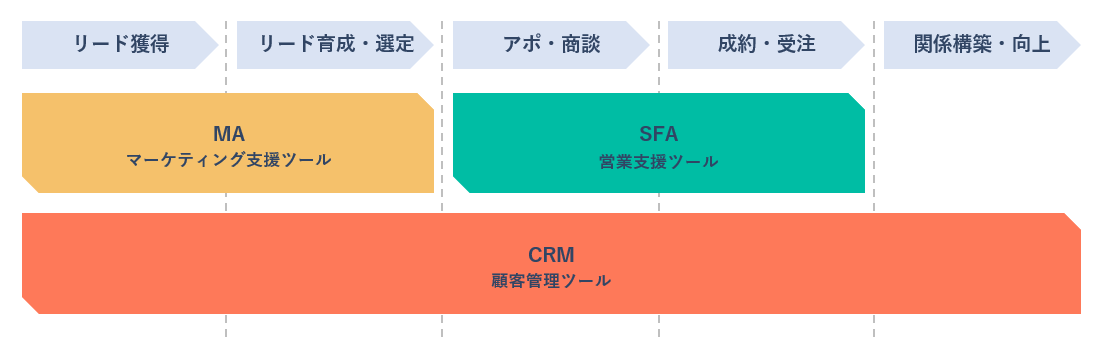
It holds for any business model, and in recruitment too the CRM is very important as the business grows.
What matters most in a recruitment business is the following.
・Attracting candidates
Getting the most from the marketing, and raising the rate at which interviews are arranged
・Winning vacancies
Recruiting advisers winning their own vacancies efficiently
・Placements
Managing matching, status and quality so they turn into revenue
・Hiring
Building the applicant pool and improving conversion through it
In each of those areas you need a firm grasp of the data, and to manage the business on it.
Managing and analysing data is an area people tend to keep at arm’s length.
Precisely because it is the most important and the most difficult part, choosing a CRM that makes it easy is the crux.
2. CRMs commonly used in recruitment
2.1 CRMs built for recruitment
PORTERS
A CRM built for the recruitment business, with more than 2,000 implementations.
It can be used at any size of company, from startup to enterprise.
It has a full set of the features a recruitment business cannot do without, such as managing candidates and vacancies.
Career Plus
A cloud system with everything you need to run a recruitment business.
Its distinguishing feature is how far it can be customised.
2.2 General-purpose CRMs
HubSpot
A platform used by more than 299,000 companies in 135 countries (as of May 2026), joining up marketing, sales, content management and customer service.
Its distinguishing features are that it can be used free, that it is pleasant to operate, and that it connects well to other services.
Kintone
A cloud platform for improving operations, from Cybozu. You can build and run applications of real practical use — daily reports, scheduling, enquiry handling, customer management, hiring management.
Salesforce
A platform providing CRM, sales force automation and marketing automation to more than 150,000 companies worldwide. Its distinguishing feature is how far it extends: specialist engineers implement features to fit each company.

3. The overall picture of using HubSpot in recruitment
We will describe the picture with HubSpot in place in two situations:① combined with an existing CRM、② everything in HubSpot— in those two situations.
① A CRM built for recruitment is already in place
A CRM built for recruitment is good at managing candidates and vacancies, but its marketing features are not sufficient.
Optimising the marketing and sales that win candidates and vacancies matters a great deal.
So connect the existing CRM to HubSpot, and let each fill the other’s gaps.
The picture is as below.
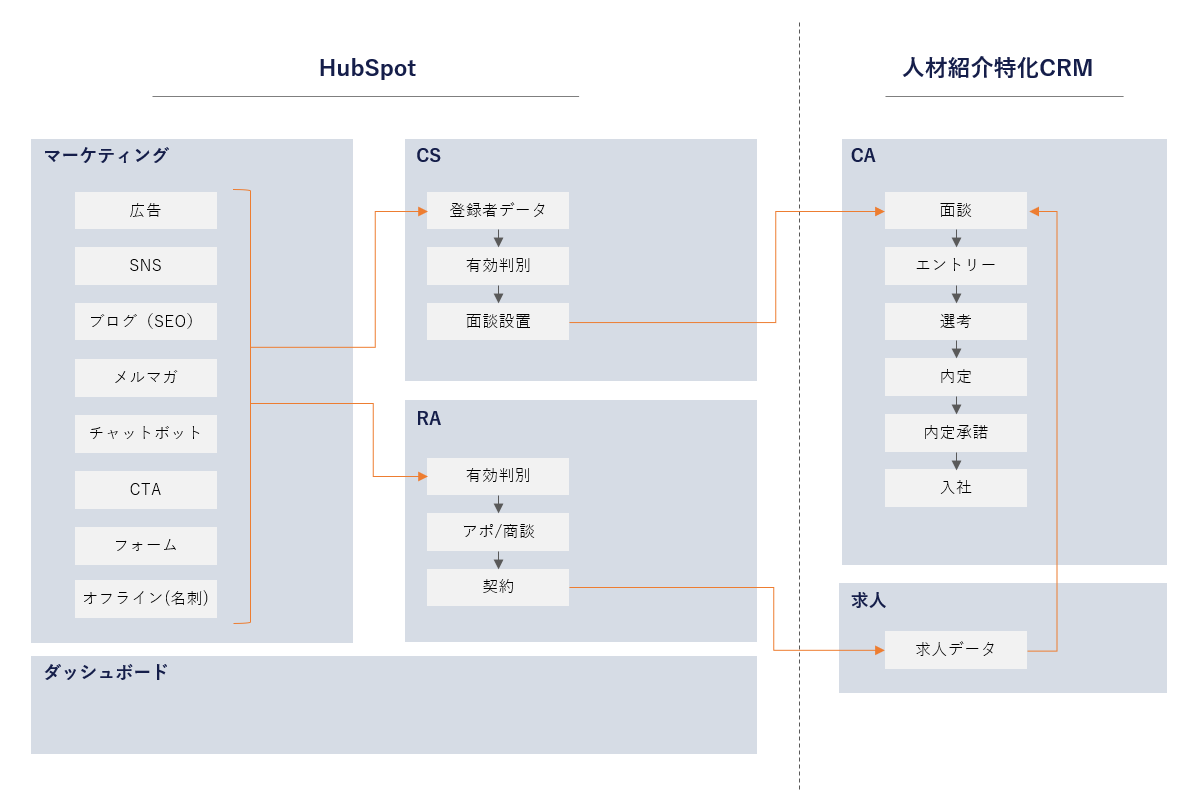
On the candidate side, everything from marketing through to customer support is done in HubSpot.
(In some cases there is no support function and the career advisers arrange the interviews themselves.)
Only candidates with an interview arranged are passed to the existing CRM, handing the information to the career adviser.
On the vacancy side, lead details, appointments and the detail and status of each deal are managed in HubSpot,
and passed to the existing CRM at the point the vacancy is won.
Doing it this way strengthens marketing and sales while keeping the strengths of the existing CRM.
Because the day-to-day handling of candidates and vacancies does not change, there is less strain internally, and the move from implementation to running it goes smoothly.
And for analysis, HubSpot’s reports and dashboards let you make any of the data visible.
② Running the recruitment business on HubSpot alone
Next, the picture where HubSpot is the whole CRM for the business.
Unlike ①, there is only HubSpot, so candidate and vacancy management happen there too.
Because every part of the work is on one platform, the strain of connecting and running tools falls away.
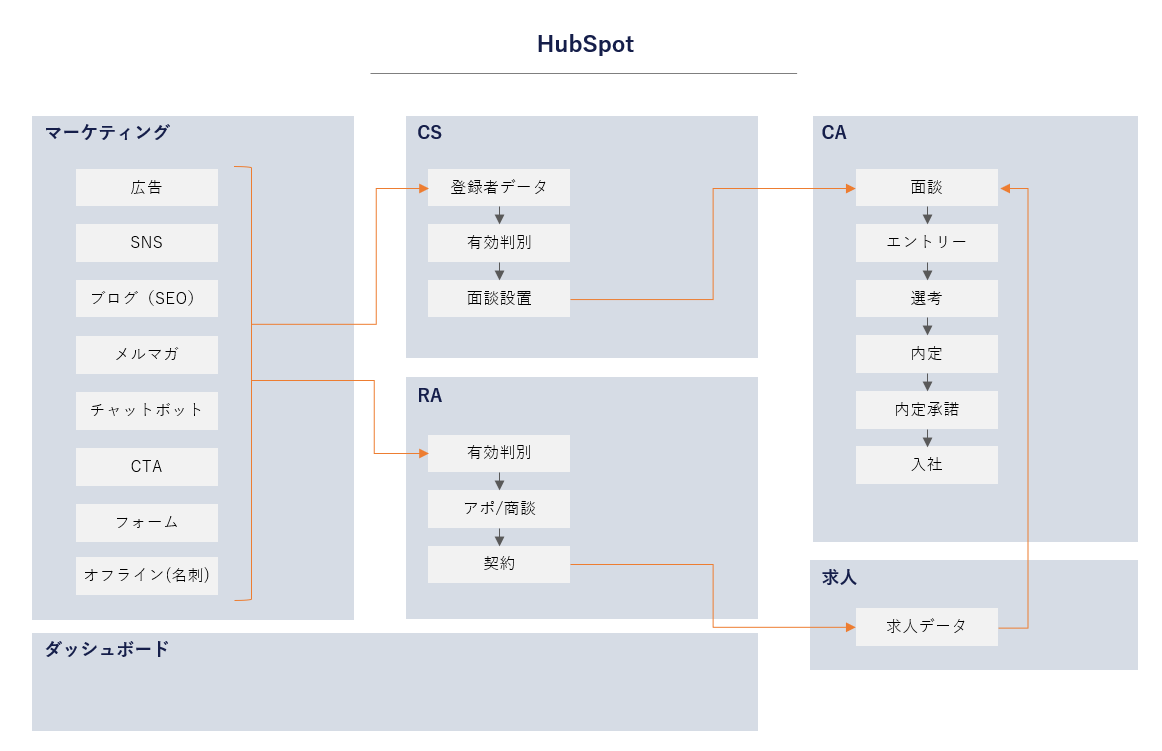
Note: managing vacancies requires the Enterprise plan, which allows custom objects.
For advice on which plan,click hereplease get in touch here.
From here, a detailed look at how HubSpot can be used in each area.
4. Marketing
Its greatest strength, we think, is that having every feature not only makes the marketing fuller but removes the extra development and administration.
What HubSpot can do in marketing is mainly the following.
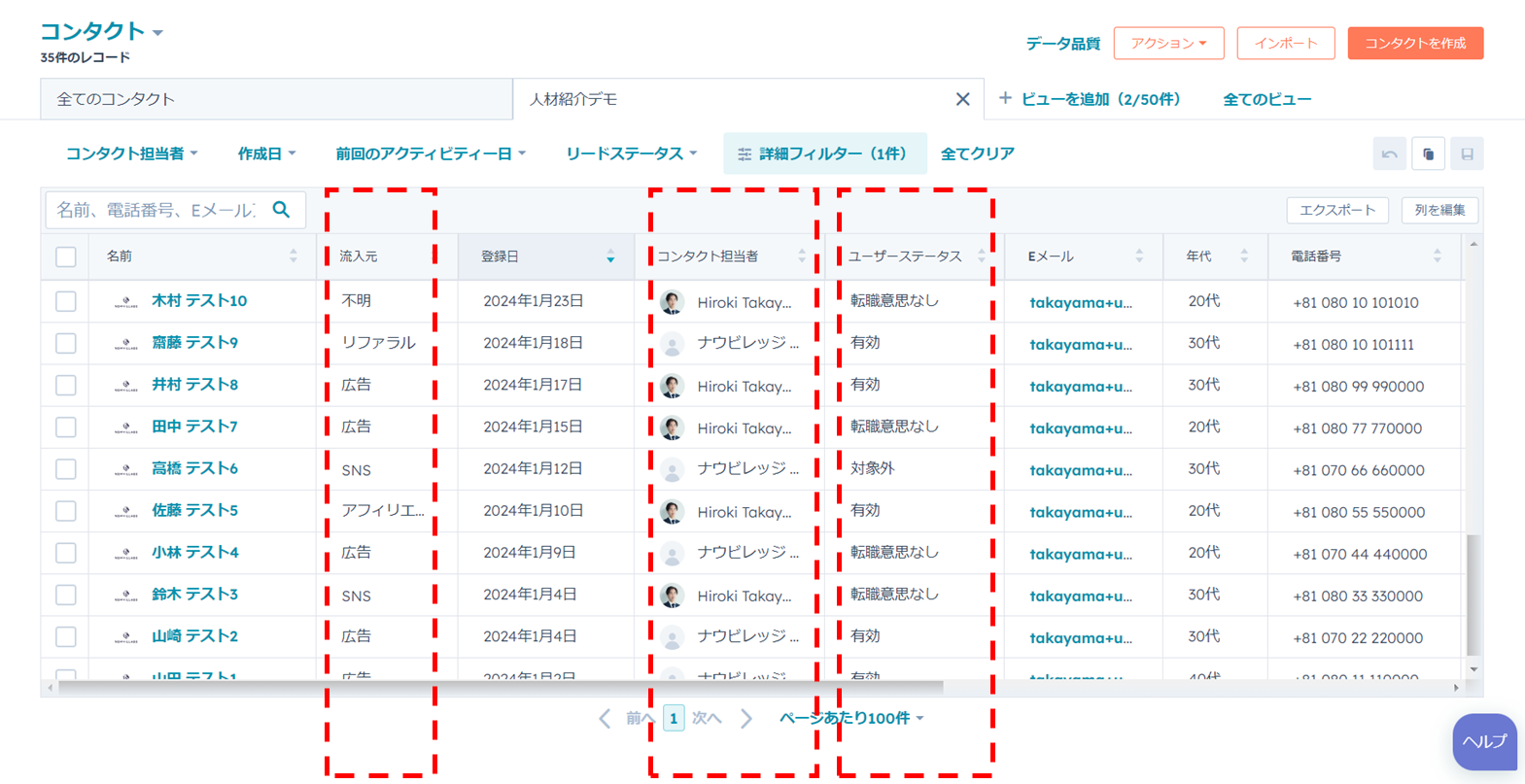
Sources are recorded automatically
Unglamorous, but extremely useful.
With an existing CRM, analysing where candidates came from means splitting the landing pages by channel, or development work to read and store the URL parameters you attach.
HubSpot identifies the page and form the registration came through and stores it automatically, so no extra development cost arises.
It also helps in analysing results by marketing channel.
For a marketer or a decision-maker, that is one worry about strategy and tactics resolved.
Advertising integration
It connects to Google Ads, Meta Ads and LinkedIn Ads.
Detailed tuning still has to be done in each ad platform, but you can see how the advertising is performing straight away, on one platform.
Stronger SEO
It has features for managing SEO strategy and content.
Beyond that you can build and place the calls to action, pop-ups and forms you need to make more of organic traffic. Each element can be analysed separately as well, which is welcome for any company doing SEO work.
It also has a CMS, so if you are about to start on SEO and have not settled on one, it is worth considering.
Social integration
In recruitment, career advisers often run social accounts on X or Instagram, and
because HubSpot connects to them, you can see at once which account contributed to attracting candidates.
On X in particular, the more people log in to a single account, the more likely it is to be banned.
Using HubSpot’s integration, people who are not logged in to the account can still post and analyse.
For a company putting weight behind its official accounts, that is an important feature.
Newsletters
You can send plain-text or designed HTML email, to everyone, to a segment, or as a sequence.
To candidates you can send vacancy information — featured employers, newly listed roles —
and to employers you can nurture by sending candidate information with the details masked, in the form of recommended candidates looking to start in a given month.
Because you can see who opened and who clicked, you can target the users who acted on the email — the hot ones — with a further approach.
HubSpot also includes marketing automation, so the marketing work can be automated and made more efficient.
Related article:[Essential for attracting candidates?] Types, features and examples of marketing automation tools for recruitment
On marketing strategy and methods in recruitment, see the article below.
「The complete guide to recruitment marketing」

5. Customer support
Making the exchanges visible
An obvious feature, but you can assign a support owner to a registration, and enter what a call produced straight away.
Here are the main things that can be managed against each registration.
・Form submissions
・Email sent and received, with history
・Notes
・Tasks
Open a registration’s detail and anyone can see all of it, so information is shared easily.
LINE integration
A fair number of firms say they want to use LINE with candidates, or already do.
But their existing CRM is often not connected to LINE, or can do little with it.
In HubSpot you can add a dedicated app and connect LINE to HubSpot as the CRM.
What HubSpot and LINE together can do is mainly the following.
- Share registration details between HubSpot and LINE
- Send LINE messages to segments, or as a sequence
- One-to-one exchanges
- Build a rich menu for each audience
- Analyse the communication on LINE
- Analyse where contacts came from
The article below explains what HubSpot and LINE do in detail, with an implementation example.
「A thorough guide to nurturing candidates with LINE in recruitment [more interviews, more placements, less work]Read it
6. Career advisers
This section is for readers running the whole business on HubSpot.
Managing candidate status and information
Candidate status can be managed clearly, against the stages you define, as in the diagram below.
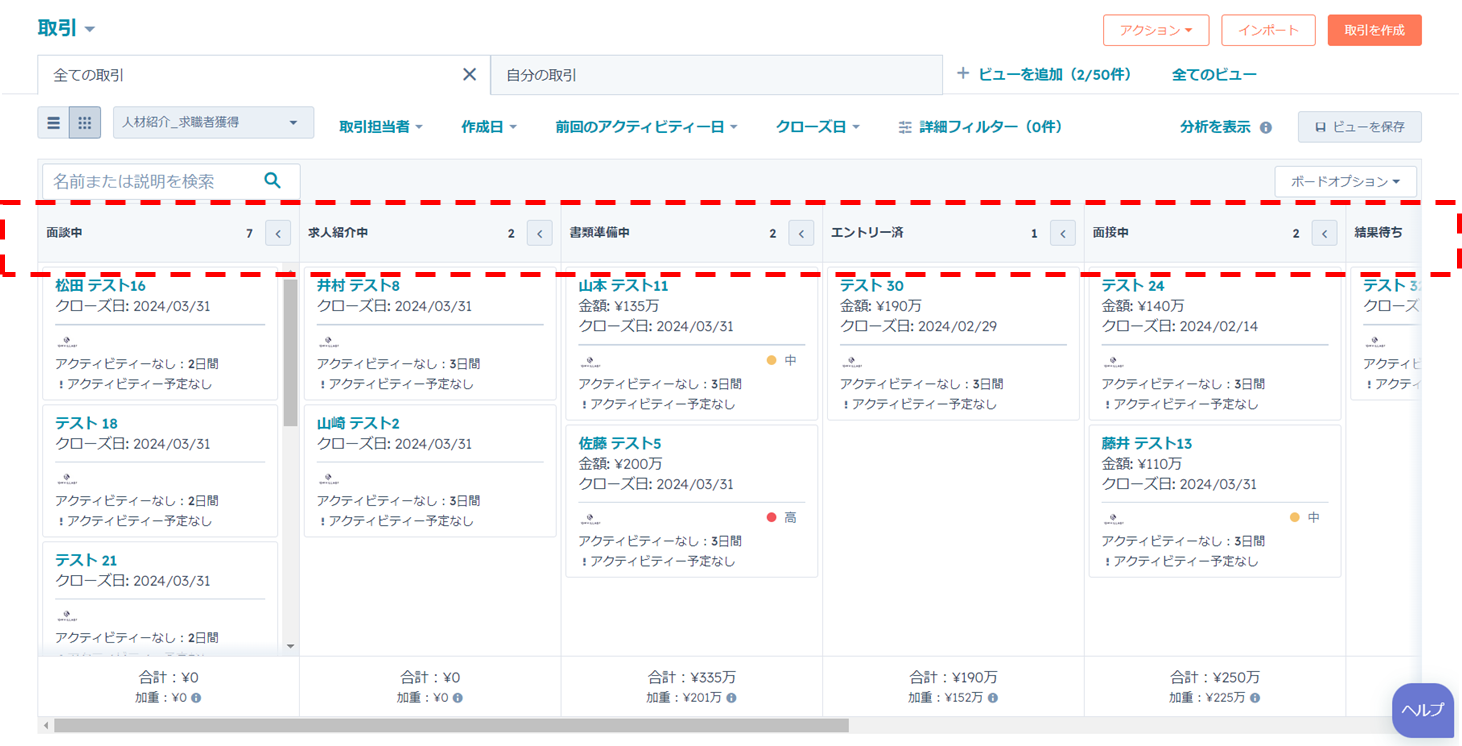
You can filter instantly from this screen, and save the states you look at often as views.
- By owner
- By vacancy
- By candidate
- By any period — month, day and so on
- By status
The record of interviews with a candidate, and the vacancies they have applied for, can be seen from each detail screen.
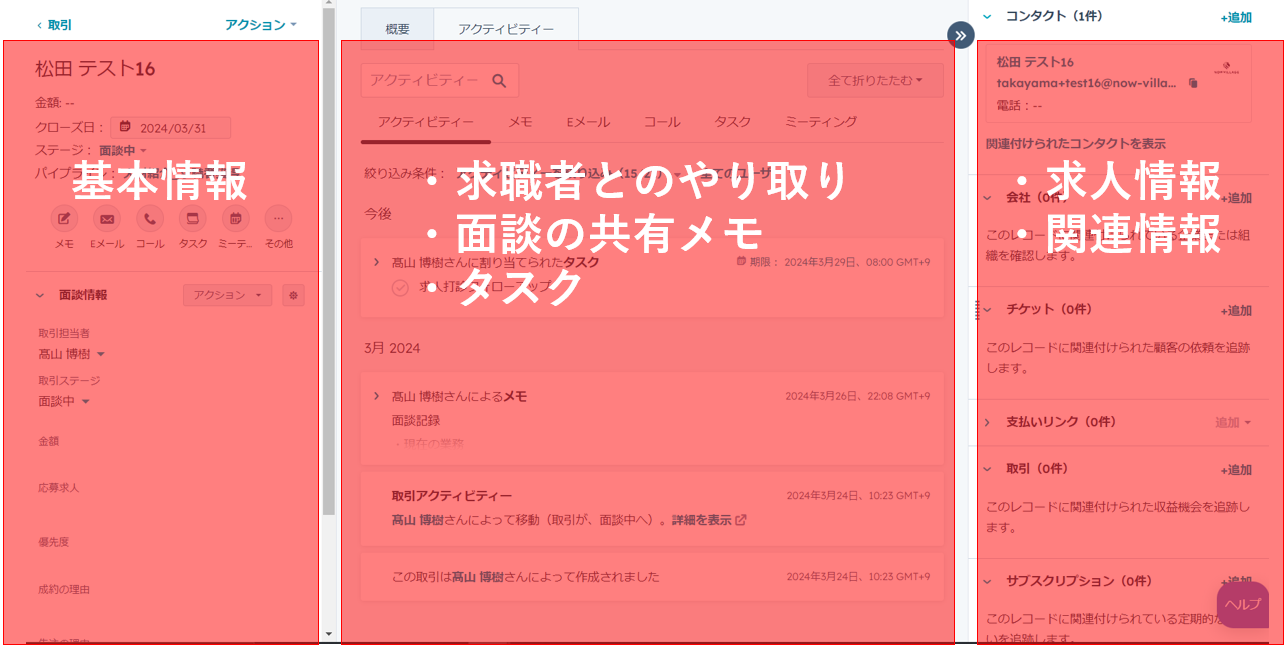
Matching to vacancies
Search the vacancies held in HubSpot for ones that meet the criteria, and link them to the candidate.
This too can be done from the candidate’s detail screen.
For matching, a custom application NowVillage has built makes the work a great deal more efficient.
What the custom application does:
- Pre-filter vacancies against the candidate’s criteria
- Search vacancies on several criteria at once
- Copy and paste vacancy details
- Create deals in bulk, linking candidate to vacancy
and so on
For questions about features or price, click here please get in touch here.
7. Recruiting advisers
Lead details won at dinners, at events or through outbound work can be brought in, and the sales process from appointment to signed vacancy managed.
As with the selection stages on the career adviser side, you define the sales stages and work against them.
▽Useful features
Tracking progress
・Notes
・Tasks
・Meeting logs
The article below covers ways of winning vacancies in the recruitment business — all of which can be run in HubSpot.
「The complete guide to recruitment marketing, B2B edition」
And because HubSpot’s mobile app lets you enter and check information while out — visiting an employer, at an event, at dinner — and read business cards and store the details.
8. Hiring
Customise the pipeline stages seen in the adviser sections for your own hiring, and it serves as an applicant tracking system for managing hiring progress.
The details of each interview can be managed against each applicant.
Set notes, tasks and reminders, and make sure no approach to a good candidate is missed.
Recommended for readers about to put weight behind hiring, and for those who simply want to track hiring progress.
9. Making the data visible in each area
It is hardly an overstatement to call this the most important part of running a recruitment business.
You cannot make management decisions without a grasp of the data.
So we have defined the key success factors for running a recruitment agency, as follows.

To review these weekly and monthly and make the right decisions, use HubSpot’s dashboards.

It removes the nuisance of “marketing is on this spreadsheet, the support and adviser figures on that one”, and the human error that comes with building reports.
10. The pros and cons of HubSpot in recruitment
The advantages, as above, leave nothing to be desired: HubSpot has a full set of features that support the work in every area to a high standard.
We see no conspicuous disadvantage, but proceed with the following in mind.
■Where HubSpot is combined with an existing CRM, you need to check first whether that CRM can connect to outside systems. Confirm whether it can connect to your applicant tracking system and the other tools you use.
HubSpot’s price varies with the plan and the number of users.
NowVillage will advise on the plan that fits your business, so please feel free to get in touch.
Get in touchclick here
11. Should you bring HubSpot in?
We hope that was useful.
This article has explained that HubSpot works for a recruitment business, and what using it looks like.
To state the conclusion again: in recruitment, we recommend HubSpot to readers who recognise the following.
・You put weight behind digital marketing, or want to
・You want to use LINE to communicate smoothly with candidates
・You want to put weight behind winning vacancies
・You want the data visible and used in running the business
・Readers unsure which CRM to choose
We hope that has been of some use.
For bringing HubSpot into a recruitment business, leave it to NowVillage.
・A record of marketing support for more than 150 companies in the staffing and recruitment sector
・A certified HubSpot partner
Get in touchclick here
On the API integration service between HubSpot and PORTERS,click hereplease get in touch here.
SupervisorReviewed by

HIROKI TAKAYAMADirector and CGO, NowVillage Inc.
Has worked on marketing for more than 500 companies, from HubSpot implementation and operations through to SEO and AEO strategy.
View profileContact
Shall we design your next move in marketing, working back from the result?
Drawing on work with more than 500 companies, we will propose the move that will do the most for you.


